What is the GoDaddy POS Hardware Rental program?
The GoDaddy POS Hardware Rental program lets GoDaddy Payments merchants rent GoDaddy Smart Terminals for a low monthly fee, instead of purchasing the hardware outright. It's ideal for businesses that want to accept in-person payments without a large upfront hardware investment.
Check out some commonly asked questions about the GoDaddy POS Hardware Rental program. Select a question to see its answer:
General info- How does the GoDaddy POS Hardware Rental program work?
- What are the available POS devices and prices?
- Is a GoDaddy Payments account required to rent a GoDaddy Smart Terminal?
- Can I purchase a device instead of renting one?
- Can I rent accessories, like a printer or cash drawer?
Rentals and subscriptions
- How do I rent a GoDaddy Smart Terminal?
- When will my rental device arrive?
- Can I rent more than one device at a time?
- How long is the rental term? Can I extend my rental?
- Can I add additional devices to my existing rental?
- Where can I manage my rental subscription?
- Where can I find the rental agreement?
Payment
Smart Terminal setup and troubleshooting
- How do I set up my GoDaddy Smart Terminal?
- My Smart Terminal isn’t working. How do I get help?
- What do I do if my device is lost or physically damaged?
- What is the warranty for rental devices?
Cancellations and returns
- What is the cancellation policy? Is there a cancellation fee?
- How do I cancel my rental subscription and return my device?
- Can I cancel my subscription early?
- What happens if I don’t return the rental device on time?
- Can I purchase my device instead of returning it?
General info
How does the GoDaddy POS Hardware Rental program work?
The GoDaddy POS Hardware Rental program lets you rent GoDaddy Smart Terminals for a low monthly fee, as an alternative to purchasing the hardware outright.
Select the rental plan option for an available Smart Terminal and then pay a low monthly fee for the duration of your rental. When you no longer need it, cancel the subscription and return the rental hardware. (A 6-month minimum rental is required.)
If you’re deciding between a hardware rental or purchase, these are some points to consider:
| Rental plan | Purchase | |
|---|---|---|
| Best for | Getting started without a large upfront cost | Businesses who prefer a one-time investment |
| How it works | Monthly payments to use the device, with the freedom to adapt as your business grows | Pay once and own the device outright |
| Terms | 6-month minimum term commitment | No contract or ongoing commitment |
| Flexibility | Cancel anytime after 6 months— early cancellation fees apply. Return the device when you’re done. | The device is yours to keep—no returns or conditions |
| Warranty | Warranty included for the full duration—limited warranty applies as long as you have an active plan. | 1-year limited warranty included |
What are the available rental devices and prices?
The GoDaddy Smart Terminals listed below are available to rent. Learn more about GoDaddy Smart Terminals to decide which device will work best for your business.
| Device | Info | Rental price |
|---|---|---|
| Smart Terminal Flex |
| |
| Smart Terminal Duo |
| |
| Smart Terminal Pro |
|
Is a GoDaddy Payments account required to rent a GoDaddy Smart Terminal?
Yes. The rental hardware is designed to work with GoDaddy Payments, so you’ll need an active GoDaddy Payments account to rent and use the GoDaddy Smart Terminal.
Learn how to set up a GoDaddy Payments account.
Can I purchase a device instead of renting one?
Yes. GoDaddy Smart Terminals are also available to purchase directly through your GoDaddy Payments dashboard.
Can I rent accessories, like a printer or cash drawer?
GoDaddy Smart Terminals can connect to a variety of external accessories, like printers, cash drawers and barcode scanners. You can purchase accessories through your GoDaddy Payments dashboard, but they aren’t currently available to rent.
Learn more about compatible accessories for GoDaddy Smart Terminals.
Rentals and subscriptions
How do I rent a GoDaddy Smart Terminal?
This is the process in a nutshell:
- If you haven’t already, set up a GoDaddy Payments account.
- In your Payment Tools page, select Rental Plan below the Smart Terminal you’d like to rent. Select Buy Now.
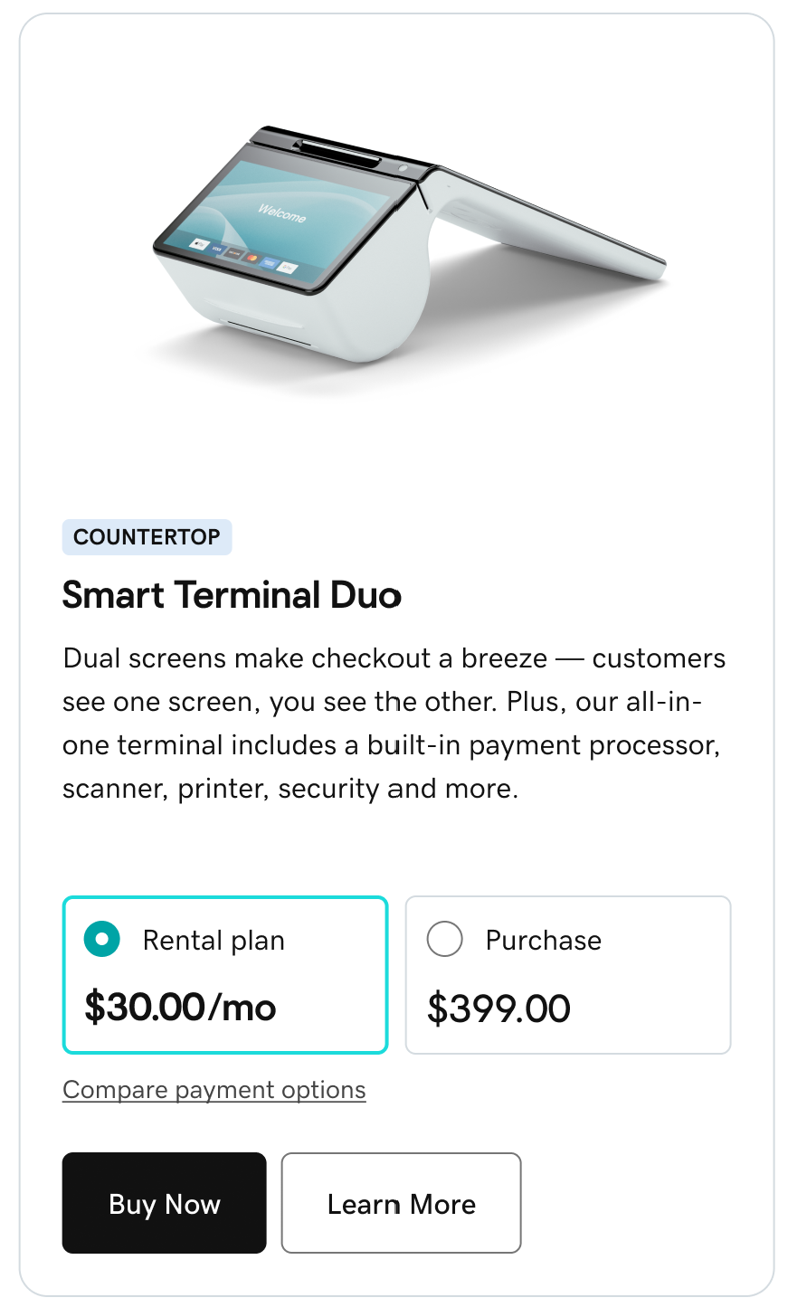
- Provide your payment info and place your order.
- Your rental equipment will arrive within 2 business days. Use the included setup steps to get started (we can help with that). You’re ready to process in-person payments!
When will my rental device arrive?
Your GoDaddy Smart Terminal will arrive within 2 business days of placing your order. Track your order through the In Person – Devices area of your GoDaddy Payments dashboard.
Can I rent more than one device at a time?
Yes, you can rent up to 10 Smart Terminals at one time. You can also rent different types of GoDaddy Smart Terminals—like a Smart Terminal Pro to take payments at the counter and the portable Smart Terminal Flex for tableside payments.
How long is the rental term? Can I extend my rental?
There’s a 6-month minimum rental requirement. After that, you can rent the hardware for as long as you like and cancel the subscription at any time. You’ll be charged the monthly fee until you cancel the subscription and return the rental hardware.
Can I add additional devices to my existing rental?
Each GoDaddy Smart Terminal is treated as a standalone rental. To rent more devices, initiate the rental process for any additional GoDaddy Smart Terminals you’d like to rent. You’ll be charged the monthly fee per device.
Where can I manage my rental subscription?
Visit your Renewals & Billing page to change your designated payment method or learn how to initiate a rental cancellation and return. Your rental will automatically renew each month until you cancel it, so you don’t need to set or extend specific rental length terms. (Please note that a 6-month minimum rental length is required to avoid cancellation fees.)
You can also manage all purchased and rented POS devices directly through the In Person – Devices area of your GoDaddy Payments dashboard.
Where can I find the rental agreement?
Please visit the Point of Sale Agreement for a copy of the rental agreement.
Payment
When will I be charged?
You’ll be charged monthly for each rental, from the date your rental begins.
To see the next payment date for each rental, visit your GoDaddy Renewals & Billing page and select Manage Subscriptions. Each Smart Terminal rental is listed under your subscriptions, with the date of the next charge.
What happens if I miss a payment?
Each month, we’ll automatically charge the rental fee to the payment method on file. If there’s an issue with the payment, we’ll try charging again and then notify you of the payment issue. You can change your designated payment method in your GoDaddy Renewals & Billing page.
If you wish to cancel your rental subscription and return the rented device, please
How do I change my payment method?
Visit your Renewals & Billing page to change your designated payment method. You can manage your payment method for each individual rental device or update them all together.
For additional details, review how to update your subscription payment.
POS device setup and troubleshooting
How do I set up my GoDaddy Smart Terminal?
Setup guides for all GoDaddy Smart Terminals are provided below.
First-time setup guides will walk you through the basics of getting connected. Once you’re set up, check out the onboarding guides for an in-depth look at in-person selling with GoDaddy Payments.
- Smart Terminal Duo
- Smart Terminal Flex
- Smart Terminal Pro
My Smart Terminal isn’t working. How do I get help?
If your GoDaddy Smart Terminal is having an issue, such as no power or card read errors, you may be able to troubleshoot and fix the issue on your own. Use the links below to review troubleshooting articles for your device.
- Smart Terminal Duo troubleshooting
- Smart Terminal Flex troubleshooting
- Smart Terminal Pro troubleshooting
If your issue isn’t listed, or if troubleshooting doesn’t resolve the problem, please
What happens if a rental device is lost or physically damaged?
Rental hardware must be returned without signs of physical damage, abuse, tampering or hardware alteration. A $300 charge will be applied for non-returned or physically damaged hardware.
If a rental device is no longer working correctly, we recommend that you first use the links below to try troubleshooting the issue. If the rental device is missing or if troubleshooting does not resolve your issue, please
- Smart Terminal Duo troubleshooting
- Smart Terminal Flex troubleshooting
- Smart Terminal Pro troubleshooting
For additional details about the rental warranty coverage, please review the Point of Sale Agreement.
What is the warranty for a rental device?
Rental devices are covered under the same limited warranty as purchased devices for the full duration of the rental. The limited warranty covers manufacturer defects and any issues that arise from normal hardware wear and tear. If troubleshooting does not resolve your issue, we’ll replace the rental device at no charge, no matter how long you’ve had it.
The rental warranty does not cover lost or stolen equipment, physical damage, abuse, tampering or hardware alteration. For additional details about the rental warranty coverage, please review the Point of Sale Agreement.
Cancellations and returns
What is the cancellation policy? Is there a cancellation fee?
There’s a 6-month minimum rental period for GoDaddy Smart Terminals through the GoDaddy POS Hardware Rental program. Once you’ve met the 6-month requirement, you can cancel and return the device at any time with no cancellation fee.
Here’s a breakdown of fees, depending on when you cancel your rental:
- Within 30 days: No cancellation fee. If you decide the GoDaddy Smart Terminal isn’t what you’re looking for, contact us within 30 days to initiate a return at no additional charge.
- 30 days-6 months: The fee is the remaining amount of the 6-month rental term. For example, if you cancel after 4 months, you’ll be charged for the remaining 2 months.
- After 6 months: No cancellation fee. After the 6-month window is passed, you can rent the hardware for as long as you like and cancel at any time.
When you cancel the rental subscription, you’ll have 30 days to return the equipment using the provided shipping label and instructions from GoDaddy. An additional $300 charge will be applied for non-returned or physically damaged hardware.
For additional details about rental terms, please review the Point of Sale Agreement.
How do I cancel my rental subscription and return my device?
Contact us to let us know that you’re ready to cancel the rental and return the device. - Check your email for the prepaid FedEx label and return instructions.
- Gather the GoDaddy Smart Terminal and any included accessories. You'll need to return the following items:
- Smart Terminal Duo: Smart Terminal Duo and charging dock
- Smart Terminal Flex: Smart Terminal Flex only
- Smart Terminal Pro: Smart Terminal Pro display, stand and accessory hub
- Bring the email and rental equipment to a local FedEx drop-off location within 30 days. FedEx will package the items, print the return label and mail the shipment back to us.
Can I cancel my subscription early?
Once you’ve met the 6-month rental requirement, you can rent for as long as you like and cancel your subscription at any time. You’ll be charged the monthly rental fee until you cancel the subscription and return the rental hardware.
What happens if I don’t return the rental device on time?
You’ll have 30 days to return the rental device from the date that you cancel your rental subscription. After 30 days, a $300 non-return fee will be charged for each unreturned rental device.
Please use the prepaid FedEx label to return your rental device to ensure it’s trackable and addressed correctly. If you need additional time after canceling your rental subscription, please
For details about the rental terms, please review the Point of Sale Agreement.
Can I purchase my device instead of returning it?
GoDaddy Smart Terminals rented through the GoDaddy Hardware Rental program are for rental only and cannot be purchased through the rental program. We don’t currently offer a lease-to-own program.
If you’d prefer to purchase a GoDaddy Smart Terminal, the same models are also available for sale through your GoDaddy Payments dashboard.