Opprette blogginnlegg
I et blogginnlegg skriver du innhold basert på et emne eller nøkkelord, formaterer det og legger til et bilde. Alt som gjenstår er å publisere nå eller planlegge senere. Er du usikker på hva du skal si? Utkastversjoner lagres automatisk, så det er bare å skrive ned en kjapp idé og fullføre den når du er klar. Husk å legge til en bloggseksjon på nettstedet ditt for å vise innleggene.
Denne videoen er en del av instruksjonsserien for å bruke en blogg for virksomheten din .
- Gå til GoDaddy -produktsiden din.
- Rull ned, utvid Websites + Marketing og velg Administrer ved siden av nettstedet ditt.
- På instrumentbordet utvider du Markedsføring og velger deretter Blogg .
- Velg Opprett innlegg .
- Du kan velge å la kunstig intelligens (AI) generere et innlegg for deg, eller opprette et selv.
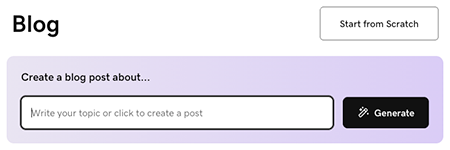
Slik lar du AI generere et innlegg for deg:
- Skriv inn et emne eller en kort beskrivelse for å veilede hva blogginnlegget handler om, eller velg bare Generer for å la AI utvikle et innlegg basert på hva det vet om virksomheten din.
- AI vil generere et blogginnlegg og vise det slik at du kan forhåndsvise det. Bruk chattegrensesnittet til å gjøre endringer, om nødvendig, eller velg Rediger under forhåndsvisning av blogginnlegget for å redigere innlegget manuelt.
For å skrive et innlegg selv, velg Start fra bunnen av og følg disse trinnene:
- Start med tittelen. Det skal inneholde hovedideenøkkelordet ditt og gi leserne en ide om fordelen de får ved å lese artikkelen din. Tittelen din må bestå av mindre enn 65 tegn.
- Legg til brødteksten. Skriv i en samtaletone og bruk overskrifter for å skille ideer. Fremhev tekst for å formatere og koble den til.
- Med markøren i tekstområdet, velger du
 legg til for å legge til bilder, video eller en skillelinje . Legg til et arkivbilde eller video, eller ett av dine egne bilder eller videoer. Lær mer om å lage et profesjonelt utseende .
 - Legg til det fremhevede bildet. Det vil vises i innlegget ditt og i bloggseksjonen på nettstedet ditt.
- Velg en kategori eller legg til en ny. Kategorier lar deg opprette flere blogger på nettstedet ditt.
Merk: For å slette en skillelinje, velg linjen og trykk på tilbaketasten eller slett -tasten på tastaturet. - Velg Publiser nå for å publisere blogginnlegget ditt umiddelbart, eller velg Planlegg , og velg deretter en dato og et tidspunkt når du vil at blogginnlegget skal publiseres automatisk.
- For å fullføre prosessen velger du Publiser nå .
Beste praksis for blogginnlegg
Disse videoene er en del av instruksjonsserien for å bruke en blogg for virksomheten din .
Mer informasjon
- Du har opprettet et innlegg! Nå er det på tide å legge til en blogginnleggseksjon på nettstedet ditt .